Most growing businesses reach the same point. The team is busy, the work is getting done, but more and more of it is the same work repeated: copying details from one system to another, chasing replies, preparing quotes, sending reminders. Adding people helps for a while. Then the processes themselves become the limit.
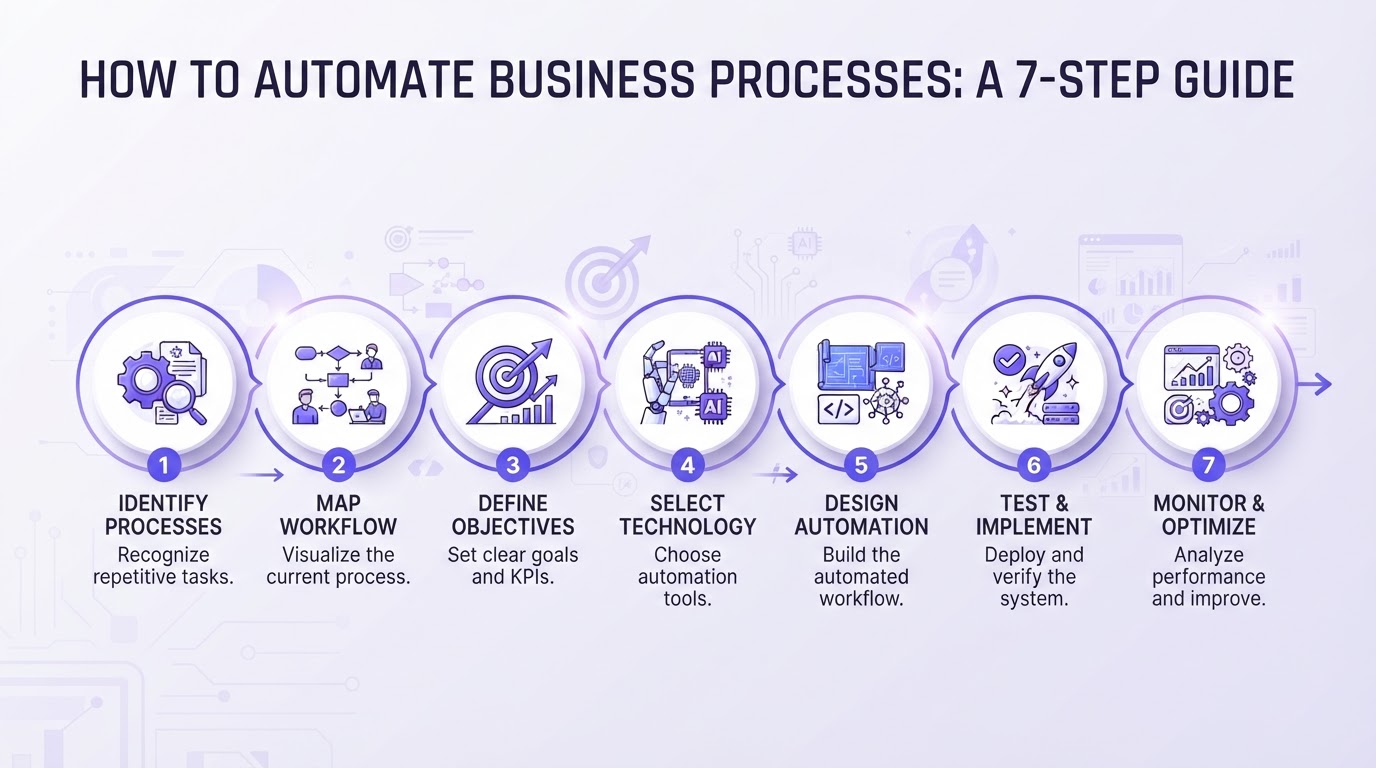
Automating business processes is how you move past that point. Not by buying another tool, but by looking at how the work flows and letting systems take over the steps that do not need a person. This guide walks you through how to automate business processes in seven steps, with examples from our own work.
What business process automation is
A business process is a series of steps that turns an input into a result: an enquiry into a booked meeting, an order into a delivery, an invoice into a payment. Business process automation means that software carries out some or all of those steps, following rules you have agreed, and hands over to a person where judgement is needed.
Automation and AI are not the same thing. Plain automation follows fixed rules: when a form is submitted, create a contact and send a confirmation. AI adds the ability to read and interpret: understanding an email, extracting details from a document or deciding which category a request belongs to. Many processes need only plain automation. AI earns its place where information arrives in free text or varying formats.
Which processes are worth automating
Good candidates have four things in common:
- They happen often: daily or weekly rather than once a quarter.
- They follow a pattern: the steps are roughly the same each time.
- They cost time or cause errors: someone spends hours on them, or mistakes are expensive to fix.
- They sit between systems: information is copied from one place to another by hand.
Typical examples are lead follow-up, appointment booking, quotes, onboarding, invoicing, reporting, document processing and content publishing.
Step 1: Map your processes
Before you automate anything, write down how the work happens today. Pick one area, for example Sales, and list the processes in it: how an enquiry comes in, who responds, what information is gathered, how a quote is made and how it is followed up.
For each process, note:
- What starts it, and what result it should produce
- Each step, and who does it
- Which systems are used at each step
- Where information is copied, checked or chased by hand
- Where it usually goes wrong or waits
Do this with the people who do the work. They know the unwritten rules: the customer who always needs a different format, the check that nobody documented, the step that gets skipped when it is busy. Those rules are exactly what an automation needs to know.
Step 2: Choose your first process
With a map in front of you, choose one process to start with. Score each candidate on three questions: how often does it happen, how much time or error does it cause, and how simple are the steps? The best first process scores high on the first two and is reasonably simple.
Resist the urge to start with the biggest, most complex process. A first project that works builds confidence and teaches your team how automation behaves. A first project that drags on for months does the opposite.
Step 3: Set the goal and the measure
Decide what success looks like before you build. Choose one or two measures you can check, for example:
- Response time to a new enquiry
- Time from request to sent quote
- Hours per week spent on the process
- Number of errors or corrections
- Share of leads followed up within a day
Measure where you are today, even roughly. Without a starting point, you cannot show what the automation has changed, and you cannot tell whether it needs adjusting.
Step 4: Choose your tools
You do not need a large tool stack. Most business process automation uses three layers:
- Your systems of record: the CRM, accounting package, planning system or project tool where the data lives.
- A workflow tool that connects them and carries out the steps: n8n, Make and Zapier are the best-known options.
- AI where it adds value: reading documents and emails, drafting replies, classifying requests or summarising conversations.
How to choose between the workflow tools:
- Zapier: the easiest to start with and connects to thousands of apps. Costs rise with volume.
- Make: more visual and flexible for multi-step flows, with a good balance of power and ease.
- n8n: the most flexible, can be self-hosted, handles complex logic and AI steps well. It asks for a little more technical skill to set up.
- All-in-one platforms: a CRM with built-in automation, such as CloudQonnect, covers lead capture, follow-up, booking and Marketing in one place, so many processes need no separate workflow tool at all.
Choose based on the systems you already use, the complexity of the process and who will maintain it. A tool your team can understand and adjust is worth more than a more powerful one nobody touches.
Connecting your tools
Most of the value in automation comes from connecting systems that do not talk to each other. Three ways to connect them:
- Native integrations: built-in connections between two tools, for example a booking tool that writes directly to your calendar. Use these first; they are the simplest to maintain.
- APIs and webhooks: most modern software lets other systems read and write data through an API, and send a signal (a webhook) when something happens. Workflow tools use these to move data in real time.
- Workarounds for older systems: where a system has no API, data can often still be exchanged through exports, email or file imports.
When you connect systems, decide which one is the source of truth for each type of data. If customer details live in the CRM, every other system reads them from there. Without that rule, you end up with duplicates and conflicting versions.
Also think about security from the start: give each connection only the access it needs, keep login details out of shared documents, and make sure every supplier that processes personal data has a data processing agreement and is GDPR compliant.
Step 5: Build and test
Build the process in small pieces and test each one with real examples before connecting the next. A practical order:
- 1.Build the trigger: what starts the process, such as a form, an email or a status change.
- 2.Add the steps one by one, checking the output at each step.
- 3.Add checks: what should happen when information is missing or does not match.
- 4.Add a route for exceptions, so cases the automation cannot handle go to a person with a clear note.
- 5.Run it alongside the old way for a short period and compare the results.
Start in review mode where it matters. Let the automation prepare the quote, the reply or the entry, and have a person approve it. Once you trust the output, let the routine cases run on their own.
Step 6: Bring your team along
Automation changes how people work, so involve them from the beginning. Explain what will change, what stays the same and what they will do with the time that is freed up. Show them how to see what the automation has done, and how to step in when something needs a human decision.
Most resistance comes from uncertainty, not from the technology. When people helped map the process and can see that the automation follows their rules, they tend to become its strongest supporters, and the first to suggest the next process to automate.
Step 7: Measure and scale
After a few weeks, compare your measures against the starting point. Look at what was corrected by hand and why, and adjust the rules. Then decide on the next process.
Scale in the order that makes sense for the business, not the order that is technically easiest. Often the next step is a process that connects to the first: once enquiries are followed up automatically, the quote that follows is a natural next candidate.
Keep a simple overview of every automation you run: what it does, which systems it touches and who owns it. That overview prevents the patchwork of forgotten flows that makes automation hard to maintain later.
How we use it ourselves
We run the same kind of automations in our own business, built in n8n and connected to CloudQonnect:
Quote automation: incoming quote requests are read, the details are collected and a quote is prepared in CloudQonnect for review, so nobody has to gather the input or retype customer details by hand.
Event ticketing: registrations and ticket details flow straight into CloudQonnect, so the attendee list is always up to date and confirmations go out automatically.
Social media: our LinkedIn content is prepared in n8n and scheduled through the social media scheduler in CloudQonnect, which keeps us consistent and visible without moving posts between tools.
In each case, the system does the reading, copying and moving, and a person makes the decisions.
Common mistakes to avoid
- Automating a broken process: if the process is unclear or inefficient, automation only makes the problem faster. Fix the process first.
- Starting too big: one working automation beats five half-finished ones.
- No owner: every automation needs someone who checks it and adjusts it when the business changes.
- No route for exceptions: cases the automation cannot handle must land with a person, not disappear.
- Buying tools before mapping processes: the tool should follow the process, not the other way round.
Where to start
If you want to know which of your processes are worth automating first, our free audit maps where time and leads get lost in your business and what to fix first. For a closer look at automation in operations, see our Operations page.
Frequently asked questions